Flipper Zero Tool
Introduction
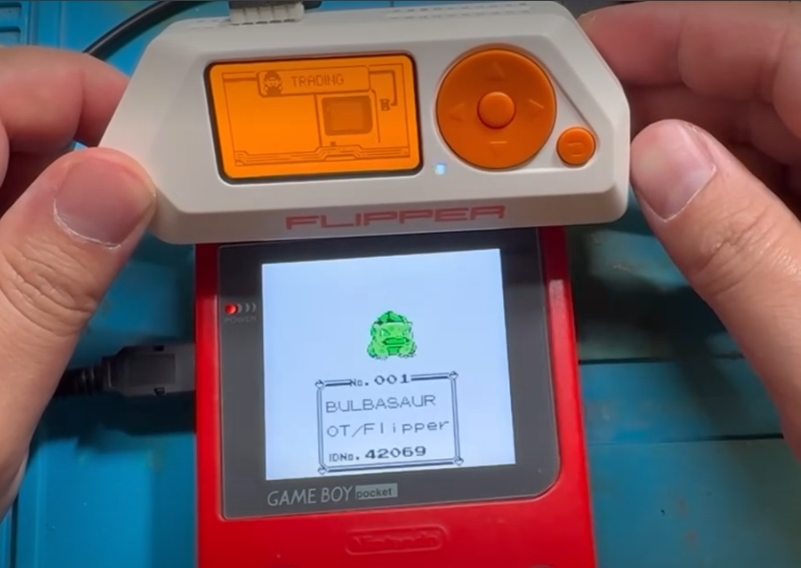
This is a project I put together a couple of years ago that combines two things I enjoy: retro Pokémon games and tinkering with hardware. The Flipper Zero is already a fun little multi-tool on its own, but being able to use it to trade Pokémon with a real Game Boy was too good of an idea to pass up.
The Project
The concept is simple. Using a Game Boy Pocket or Color link cable, the Flipper Zero can simulate a second Game Boy and trade Pokémon with your cartridge. The heavy lifting on the software side was already done by EstebanFuentealba, whose Flipper Zero Game Boy Pokémon Trading project made this all possible. My contribution was designing a small PCB that makes the whole setup a little cleaner and easier to work with.
The design process was pretty straightforward. I routed the board, sent it off to be manufactured, and it worked as expected. Nothing too dramatic to report on this one. Sometimes a project just comes together cleanly and that is perfectly fine.
The app itself is available through the Flipper app store at lab.flipper.net, and all you need hardware-wise is a link cable and the board. If you want to build your own or order one, I have the project listed on both PCBWay and OSHPark.
Where to Get It
PCBWay Shared Project: https://www.pcbway.com/project/shareproject/Flipper_Zero_Pokemon_Trading_Tool_b1f06530.html
OSHPark:
https://oshpark.com/shared_projects/k3kgwL1g
Ko-Fi Shop (pre-made boards):
https://ko-fi.com/s/fb74edab4f
GitHub:
https://github.com/Jackv-makes/Flipper_zero_Pokemon
If you have never used PCBWay before, signing up with my referral link gets you a free $5 toward your first order: https://pcbway.com/g/yL2sfr
Conclusion
This was a fun, low-stress project and it still gets a lot of use whenever I need to trade Pokemon with myself. If you are a Flipper Zero owner and a Pokémon fan, it is a pretty natural combination. Give it a try.